Cursor
AI-powered code editor built on VS Code with native AI pair programming. Cursor is an AI-native code editor developed by Anysphere Inc., built as a fork of Microsoft's Visual Studio Code.
Performance Scores
2 rankings evaluated
Score range: 7.5 – 8.5
-
#2Best AI Coding Tools and Developer Assistants 2026
Score: 8.5 · Best for: Developers who frequently refactor across many files
-
#5Best AI App Builders in 2026
Score: 7.5 · Best for: Developers who prefer editor-based generation over managed app-builder workflows
Key Facts
Company
| Attribute | Value | As of | Source |
|---|---|---|---|
| Company & adoption | Developed by Anysphere Inc. as a fork of VS Code; more than 500,000 developers reported as of early 2026. Compatible with the VS Code extension ecosystem. | Jun 2026 | Cursor official site |
Pricing
| Attribute | Value | As of | Source |
|---|---|---|---|
| Usage-based billing | Since June 2025 Cursor bills on usage: each paid plan includes a model-usage pool roughly equal to its price (Pro covers about 225 Claude Sonnet 4.5 requests), auto-routed usage is unlimited, and named-model usage beyond the pool is billed on demand in arrears. | Jun 2026 | Cursor official pricing page |
| Pricing tiers (June 2026) | June 2026 tiers: Hobby (Free $0), Pro $20/user/mo, Pro+ ~$60/user/mo, Ultra ~$200/user/mo, Teams $40/user/mo, Enterprise custom. Pro+ and Ultra figures are secondary-sourced (official page hides per-tier prices behind a UI toggle). | Jun 2026 | Cursor official pricing page |
| Pro Plan | Pro plan ($20/month) continues for existing customers only as of October 2026; new individual plans are Plus $8, Premium $30, Super $100 and Ultra $200 per month | Oct 2026 | Cursor Docs Pricing |
| Teams Plan | Teams plan from $40/user/month with admin controls and centralized billing | Sep 2026 | Cursor Pricing |
| Free Tier | Free plan at $0 with limited usage of Cursor's own models; third-party models are not available on Free. The former Hobby plan continues only for existing customers (as of October 2026). | Oct 2026 | Cursor Docs Pricing |
General
| Attribute | Value | As of | Source |
|---|---|---|---|
| Founded | 2022 | Mar 2026 | Anysphere |
| Free Tier | Free plan at $0 with limited usage of Cursor's own models (as of October 2026); the former Hobby plan continues for existing customers only | Oct 2026 | Cursor Docs Pricing |
| Pro Plan | Individual plans as of October 2026: Plus $8/month, Premium $30/month, Super $100/month, Ultra $200/month; the former $20/month Pro plan continues for existing customers only | Oct 2026 | Cursor Docs Pricing |
| Teams Plan | $40/user/month (Teams) | Sep 2026 | Cursor |
| Active Developers | Millions of developers (Anysphere claim, November 2025) | Oct 2026 | Anysphere blog Series D |
| Language Support | Any language supported by VS Code extensions (Cursor is built on the VS Code codebase) | Jul 2026 | Cursor docs — VS Code migration |
| Funding | Acquired by SpaceX (completion announced 14 August 2026). Earlier funding included a $105M Series B (January 2025) and a $2.3B Series D at a $29.3B post-money valuation (November 2025). | Oct 2026 | Cursor blog: Cursor is now a part of SpaceX |
Capabilities
| Attribute | Value | As of | Source |
|---|---|---|---|
| Composer Agent | Composer 2.5, Cursor's agentic coding model (RL fine-tuned from Moonshot's open-weights Kimi K2.5 base), plans and executes multi-file edits and terminal commands; released May 2026 | Oct 2026 | DeepLearning.AI The Batch |
Technical
| Attribute | Value | As of | Source |
|---|---|---|---|
| Model Support | Includes Cursor's own models (Grok 4.7, Grok 4.6, Grok 4.5 and Composer 2.5) in plan usage; third-party models from Anthropic (Claude Opus 5.5, Sonnet 5.5), OpenAI (GPT-5.6) and Google (Gemini 3.1 Pro) are available on Premium and higher plans, billed at API list price from prepaid credit (as of October 2026) | Oct 2026 | Cursor Docs: Models and pricing |
Strengths
- ●Purpose-built AI-native editor
- ●Strong multi-file refactoring
- ●Multi-model support (Claude, GPT, Gemini)
- ●Agentic Composer for multi-file generation
- ●Familiar VS Code-based editor
- ●Strong indexing for large codebases
Limitations
- ●Higher tiers needed for heavy use
- ●Separate editor to adopt
- ●No managed hosting (BYO deployment)
- ●Less guided than Lovable or Bolt for new projects
- ●Pricing on agent tiers is usage-based
Based on evaluations in 2 rankings: Best AI Coding Tools and Developer Assistants 2026, Best AI App Builders in 2026
Pricing Plans
Free
Free; limited usage
- ✓Limited Agent and Chat usage
- ✓Cursor's own models
- !No third-party models
Plus
($6.67/mo billed annually)
$8/mo billed monthly or $80/yr billed annually
- ✓Base weekly usage pool
- ✓Cursor's own models at fixed settings
- !Third-party models not included
Premium
($25.00/mo billed annually)
$30/mo billed monthly or $300/yr billed annually
- ✓4x the Plus usage pool
- ✓Third-party models at API list price
- !Third-party model usage billed from prepaid credit
Super
($83.33/mo billed annually)
$100/mo billed monthly or $1,000/yr billed annually
- ✓15x the Plus usage pool
- ✓Priority model access at peak times
- !Third-party model usage billed from prepaid credit
Ultra
($166.67/mo billed annually)
$200/mo billed monthly or $2,000/yr billed annually
- ✓50x the Plus usage pool
- ✓Earliest access to new products and models
- !Third-party model usage billed from prepaid credit
Teams
Per seat per month: Premium seat $30, Super seat $100, Ultra seat $200; one team can mix seat tiers
- ✓Centralized billing and administration
- ✓Agentic code reviews with Bugbot
- ✓Team marketplace for internal rules, skills, and plugins
- ✓Team-wide privacy mode
- ✓SAML/OIDC SSO
- !Third-party models billed at API list price plus the Cursor Token Rate ($0.25 per million tokens)
Enterprise
Custom pricing; contact sales; invoice/PO billing
- ✓Pooled usage
- ✓SCIM seat management
- ✓Repository, model, and MCP access controls
- ✓Audit logs and service accounts
- ✓Priority support and account management
About Cursor
Cursor is an AI-native code editor developed by Anysphere Inc., built as a fork of Microsoft's Visual Studio Code. It integrates large language models directly into the editor: multi-line completions, codebase-aware chat, an agent that edits across multiple files, and natural-language code generation. Because it is a VS Code fork, existing extensions, themes, and keybindings carry over. Cursor reported more than 500,000 developers using the editor as of early 2026.
The editor indexes the full project so its suggestions reference real variable names, patterns, and structure rather than generic snippets. Its agent (Composer) can plan and apply changes across files, run commands, and iterate, while "Tab" handles fast inline completions.
Cursor's pricing changed shape and is no longer a flat per-seat fee. As of June 2026 the tiers are: Hobby (Free, $0), Pro ($20/user/month), Pro+ (about $60/user/month), Ultra (about $200/user/month), Teams ($40/user/month), and Enterprise (custom). The shift that matters for budgeting is that each paid plan now includes a pool of model usage roughly equal to its price, then bills on demand for usage beyond it.
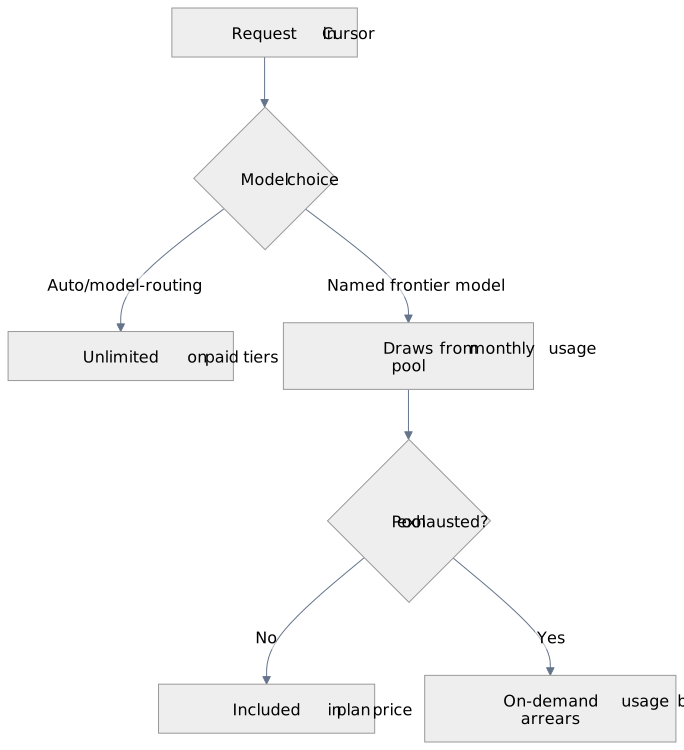
Diagram source (Mermaid)
flowchart TD
  A[Request in Cursor] --> B{Model choice}
  B -- Auto/model-routing --> C[Unlimited on paid tiers]
  B -- Named frontier model --> D[Draws from monthly usage pool]
  D --> E{Pool exhausted?}
  E -- No --> F[Included in plan price]
  E -- Yes --> G[On-demand usage billed in arrears]
On Pro, the included pool covers on the order of a couple of hundred frontier-model requests a month (Cursor cites roughly 225 Claude Sonnet 4.5 requests as a representative figure), with auto-routed usage unlimited. Heavy users move up to Pro+ or Ultra for a larger included pool rather than paying piecemeal overage. Cursor competes with GitHub Copilot, the bring-your-own-key agents Cline and Aider, and the editor-plus-AI category generally; its strength is a polished, fast editing experience, and the trade-off is a usage-metered bill that can exceed the headline $20 for developers who lean on named frontier models all day.
Editor's Note: When Cursor moved to the usage-pool model, the first thing we saw across ShadowGen client teams was bill shock: a developer who pinned every request to a named frontier model exhausted the Pro pool in about two weeks and ran into on-demand charges, while a teammate on the same plan using auto-routing never touched overage. The fix was a habit, not a plan change — default to Auto, and reserve a named frontier model for the genuinely hard problems. For one 12-developer team that single change kept them on Pro ($20) instead of pushing everyone to Ultra, saving roughly $2,160/month versus the worst-case projection. — Rafal Fila, ShadowGen
Integrations (6)
Other AI Coding & Development Tools Tools
Aider
Open-source command-line AI pair programmer that edits Git repositories with multi-file context and automatic commits.
AI Coding & Development ToolsBolt.new
In-browser AI full-stack app builder running entirely on WebContainers, with no local environment setup.
AI Coding & Development ToolsChatGPT Codex
OpenAI's cloud-based autonomous coding agent integrated into ChatGPT
AI Coding & Development ToolsClaude Code
Anthropic's agentic CLI tool for AI-assisted coding and automation development
AI Coding & Development ToolsSee How It Ranks
Best AI App Builders in 2026
AI app builders are a 2024-2026 category of products that turn natural-language prompts into deployable web applications. The category emerged from the convergence of frontier LLM capability (Claude, GPT-4o, Gemini) and improved tooling for code generation, in-browser runtimes…
Best AI Coding Tools and Developer Assistants 2026
AI coding tools have become essential for professional developers in 2026, with the category spanning full AI-native editors, IDE plugins, terminal-based assistants, and code generation platforms. This ranking evaluates the leading AI coding tools based on code suggestion…
Questions About Cursor
Can you build n8n workflows with Claude Code?
Yes. As of 26 August 2026 n8n ships a built-in instance-level MCP server that Claude Code connects to over streamable HTTP, and n8n's documentation lists Claude Code by name among its supported CLI clients alongside Codex and Gemini CLI. Connect it with `claude mcp add…
How much does it cost to give an AI agent access to your automation platform?
The cost turns entirely on the platform's billing unit, and as of 26 August 2026 only Zapier publishes an explicit per-call rate. Zapier's documentation states that "Each successful tool call through your MCP server consumes two tasks", while "Tool calls that fail do not consume…
How much do AI coding assistants cost in 2026?
As of June 2026, mainstream AI coding assistants cluster in two cost shapes. Per-seat subscriptions with included AI usage: GitHub Copilot Pro $10/month (Business $19/seat), Cursor Pro $20/month, and Claude Code and ChatGPT Codex bundled into Claude ($20+) and ChatGPT ($20+)…
What are the best workflow automation tools for technical writers in 2026?
Technical writers in 2026 typically combine Mintlify or ReadMe (docs-as-code platforms), n8n or Zapier (publishing automation), GitHub Actions (CI for docs), and Notion or Coda (drafting and review). The strongest setups treat docs as code with an automation layer for…
Learn More
Which Automation Platforms Can an AI Coding Agent Actually Edit?
This guide compares the canonical workflow representation of ten business process automation platforms and asks a single practical question of each: can an AI coding agent read that representation, change it, and put it back? It covers what each platform exports, what the export…
AI Coding Agents and Automation Platforms: Three Integration Models
This guide classifies the ways an AI coding agent can connect to a business process automation platform into three integration models: reference servers that teach an agent a platform's schema, control-plane servers that let it read and edit workflows on a live instance, and…
Claude Code vs ChatGPT Codex vs Cursor 2026: Three-Way Comparison
Claude Code (terminal CLI), ChatGPT Codex (cloud sandbox), and Cursor (VS Code fork) take three different approaches to AI-assisted coding. This three-way comparison covers pricing, autonomy, form factor, context handling, and agentic capabilities as of May 2026 to help engineers…